
Running a Shopify store means you’re already ahead of the game with one of the most powerful e-commerce platforms available. But here’s the reality: getting traffic to your store is only half the battle. The real challenge lies in converting those visitors into paying customers.
Conversion rate optimization (CRO) is the systematic process of increasing the percentage of website visitors who complete a desired action—whether that’s making a purchase, signing up for a newsletter, or adding items to their cart. For Shopify store owners, this translates directly to increased revenue without needing to drive more traffic.
The average e-commerce conversion rate across industries hovers around 2.86%. This means that out of every 100 visitors to your store, only about three will make a purchase. The good news? With strategic optimization, you can significantly improve these numbers and transform your Shopify store into a conversion machine.
Understanding Shopify Conversion Metrics
Before diving into optimization strategies, you need to understand what you’re measuring. Conversion rate optimization starts with knowing your baseline metrics and identifying where visitors are dropping off in your sales funnel. For guidance on segmentation and targeting, check out SMS segmentation to boost engagement.
Your primary conversion rate is calculated by dividing the number of conversions by the total number of visitors, then multiplying by 100. However, different pages on your Shopify store will have different conversion goals. Your homepage might focus on getting visitors to browse products, while your product pages aim for add-to-cart actions.
Key metrics to track include your overall conversion rate, add-to-cart rate, checkout abandonment rate, and average order value. Shopify’s built-in analytics provide most of these metrics, but tools like Google Analytics 4 can offer deeper insights into user behavior patterns.
Understanding these metrics helps you identify the biggest opportunities for improvement. If your add-to-cart rate is high but your checkout completion rate is low, you know to focus on optimizing your checkout process rather than your product pages.

Optimizing Your Shopify Store Design for Conversions
Your store’s design plays a crucial role in conversion rate optimization. A clean, professional design builds trust, while a cluttered or outdated appearance can drive potential customers away before they even browse your products. Learn more about conversion rate optimization techniques that work.
Start with your homepage design. Visitors should immediately understand what you sell and why they should buy from you. Use high-quality hero images that showcase your best products, and include clear value propositions that differentiate your brand from competitors.
Navigation should be intuitive and logical. Organize your products into clear categories, and ensure your search functionality works seamlessly. Mobile responsiveness is non-negotiable—over 70% of e-commerce traffic comes from mobile devices, and Google prioritizes mobile-friendly sites in search results.
Color psychology matters more than you might think. Use contrasting colors for call-to-action buttons to make them stand out, but ensure they align with your brand identity. Test different color combinations to see what resonates best with your audience.
Loading speed directly impacts conversions. Even a one-second delay can reduce conversions by 7%. Optimize your images, choose a fast Shopify theme, and minimize the use of heavy apps that might slow down your site.
Product Page Optimization Strategies
Product pages are where conversion decisions happen. These pages need to provide all the information a customer needs to feel confident about their purchase while removing any friction that might prevent them from buying. Check out top conversion rate optimization CRO tips for product page strategies.
High-quality product images are essential. Include multiple angles, close-up shots of important details, and lifestyle images showing the product in use. Consider adding video demonstrations, which can increase conversions by up to 80% on product pages.
Product descriptions should focus on benefits rather than just features. Instead of simply listing specifications, explain how those features solve problems or improve the customer’s life. Use bullet points for easy scanning, and include relevant keywords naturally throughout the description.
Customer reviews and ratings build social proof and trust. Enable Shopify’s product reviews feature or install a dedicated review app. Display reviews prominently on product pages, and don’t be afraid to show some negative reviews alongside positive ones—it actually increases credibility.
Clear pricing and shipping information prevent cart abandonment. Display prices prominently, show any discounts clearly, and provide shipping cost calculators or free shipping thresholds. If items are on sale, show the original price crossed out next to the sale price.
Streamlining the Checkout Process
Cart abandonment rates average around 70% across all e-commerce sites. Optimizing your checkout process can significantly reduce this number and boost your conversion rate optimization efforts.
Offer guest checkout options. Requiring account creation before purchase creates unnecessary friction. Allow customers to check out as guests, then offer account creation after the purchase is complete.
Keep your checkout process as short as possible. Minimize the number of form fields, use autofill when available, and consider single-page checkout designs. Each additional step in the checkout process increases the likelihood of abandonment.
Multiple payment options cater to different customer preferences. Beyond credit cards, consider adding PayPal, Apple Pay, Google Pay, and buy-now-pay-later options like Klarna or Afterpay. Shopify Shop Pay can also speed up the checkout process for returning customers.
Display security badges and trust signals throughout the checkout process. SSL certificates, secure payment icons, and money-back guarantees help customers feel confident about entering their payment information.
Mobile Optimization for Higher Conversions
Mobile optimization isn’t optional—it’s essential for conversion rate optimization success. Mobile users behave differently than desktop users, requiring specific optimization strategies.
Thumb-friendly navigation is crucial for mobile users. Ensure buttons and links are large enough to tap easily, and space them appropriately to prevent accidental clicks. The ideal button size for mobile is at least 44×44 pixels.
Simplified product pages work better on mobile devices. Use fewer images initially, but make them easy to expand. Keep product descriptions concise, and use collapsible sections for detailed information like shipping policies or size charts.
Mobile checkout should be even more streamlined than desktop checkout. Use larger form fields, enable mobile keyboards to automatically switch to number pads for numeric fields, and consider mobile wallet integrations for faster payments.
Test your mobile experience regularly using Google’s Mobile-Friendly Test tool and by actually navigating your site on various mobile devices. What looks good on your phone might not work well on different screen sizes or operating systems.

Leveraging Social Proof and Trust Signals
Social proof is one of the most powerful tools in conversion rate optimization. When customers see that others have purchased and enjoyed your products, they’re more likely to convert.
Customer testimonials should be specific and authentic. Instead of generic “great product” reviews, showcase testimonials that mention specific benefits or use cases. Include customer names and photos when possible to increase authenticity.
User-generated content like customer photos wearing or using your products provides powerful social proof. Create branded hashtags and encourage customers to share their experiences on social media, then feature this content on your product pages.
Trust badges and certifications build confidence in your store. Display security certifications, industry associations, and satisfaction guarantees prominently throughout your site. If you’ve been featured in media outlets or have notable partnerships, showcase these as well.
Inventory levels and purchase notifications can create urgency without being manipulative. Showing “Only 3 left in stock” or “5 people are looking at this item” can encourage faster decision-making, but ensure these notifications are accurate.
A/B Testing Your Shopify Store
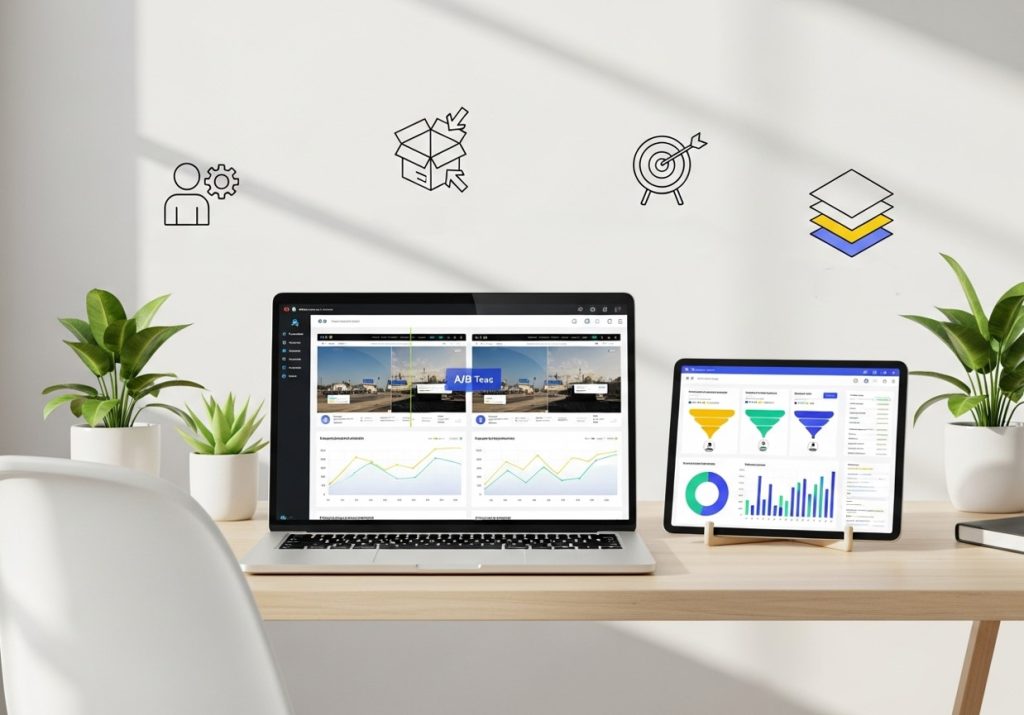
A/B testing is essential for data-driven conversion rate optimization. Rather than guessing what might work, testing allows you to make decisions based on actual user behavior and conversion data.
Learn how to run A/B testing for CRO.
Start with high-impact elements that are likely to affect conversions. Test different headlines on your homepage, various call-to-action button colors and text, different product page layouts, or alternative checkout flows.
Use Shopify’s built-in A/B testing features or apps like Google Optimize to run tests. Ensure you’re testing one element at a time to clearly identify what’s driving any conversion changes. Run tests long enough to achieve statistical significance—typically at least two weeks or 1,000 visitors per variation.
Test mobile and desktop experiences separately, as what works on one device might not work on another. Mobile users often have different browsing patterns and conversion behaviors than desktop users.
Document your testing results and learnings. Keep track of what worked, what didn’t, and any insights about your customer behavior. This knowledge becomes invaluable for future optimization efforts.
Advanced Conversion Rate Optimization Techniques
Once you’ve mastered the basics, advanced techniques can help you squeeze even more conversions from your traffic. These strategies require more sophisticated implementation but can deliver significant results.
Personalization based on customer behavior can dramatically improve conversions. Show different homepage content to returning visitors, recommend products based on browsing history, or offer location-based promotions. Shopify apps like Dynamic Yield or Nosto can help implement these features.
Exit-intent popups capture visitors who are about to leave your site. Offer discounts, free shipping, or valuable content in exchange for email addresses. While these should be used sparingly to avoid annoying visitors, they can recover otherwise lost sales.
Retargeting campaigns bring back visitors who didn’t convert on their first visit. Use Facebook Pixel or Google Ads to show targeted advertisements to previous visitors, focusing on the products they viewed or similar items.
Progressive disclosure reveals information gradually rather than overwhelming visitors with details upfront. On product pages, you might show basic information initially, then allow customers to expand sections for sizing guides, care instructions, or detailed specifications.
Measuring and Tracking Your Optimization Efforts
Effective conversion rate optimization requires continuous measurement and analysis. Set up proper tracking systems to monitor your progress and identify new optimization opportunities.
Google Analytics 4 provides detailed insights into user behavior, conversion paths, and revenue attribution. Set up Enhanced Ecommerce tracking to see exactly where customers are dropping off in your sales funnel and which products are driving the most conversions.
Shopify’s native analytics offer valuable insights into your store’s performance, including conversion rates by traffic source, average order values, and customer lifetime value. Use these metrics to understand which marketing channels are bringing your most valuable customers.
Heat mapping tools like Hotjar or Crazy Egg show how visitors interact with your pages. You can see where people click, how far they scroll, and which elements they ignore. This visual data often reveals optimization opportunities that aren’t apparent in traditional analytics.
Regular conversion audits help identify new optimization opportunities as your business grows and changes. Monthly reviews of your conversion metrics, customer feedback, and site performance can reveal trends and issues before they significantly impact your business.
Taking Your Conversions to the Next Level
Conversion rate optimization is an ongoing process, not a one-time project. The strategies outlined in this guide provide a solid foundation for improving your Shopify store’s performance, but the key to long-term success lies in continuous testing, measuring, and refining.
Start by implementing the fundamental optimizations—improving your site speed, mobile experience, and checkout process. These changes often provide the biggest initial impact on conversion rates. Then gradually test more advanced strategies like personalization and progressive disclosure.
Remember that what works for one store might not work for another. Your customers, products, and brand are unique, so your optimization strategy should be tailored accordingly. Focus on understanding your specific audience through data analysis and customer feedback, then test solutions that address their particular needs and concerns.
The investment in conversion rate optimization pays dividends over time. Small improvements in conversion rates compound into significant revenue increases, making every dollar spent on traffic acquisition more valuable. With patience, testing, and strategic implementation, you can transform your Shopify store into a highly optimized conversion machine that consistently turns visitors into loyal customers.
Frequently Asked Questions (FAQ)
How do I know if my Shopify store needs CRO?
If your traffic is steady but sales are low, or if you notice high cart abandonment rates, poor engagement on product pages, or low repeat purchases, your store likely needs conversion rate optimization.
Which Shopify apps are best for CRO?
Popular apps include Klaviyo (email personalization), Hotjar (heatmaps and visitor recordings), Lucky Orange (real-time visitor insights), Nosto (AI-driven personalization), and Optimizely or Google Optimize (A/B testing).
Can CRO work for new Shopify stores with low traffic?
Yes, but focus first on foundational optimizations such as fast loading speeds, mobile responsiveness, clear navigation, and product page clarity. CRO is more impactful when paired with consistent traffic.
How long does it take to see results from CRO?
Initial improvements like better design or streamlined checkout can produce quick results within weeks. More advanced strategies, such as personalization and behavioral testing, may take months to fully optimize.
Is CRO a one-time project?
No. CRO is an ongoing process. Continuous testing, monitoring, and refinement are essential to adapt to changing customer behavior, seasonal trends, and market conditions.
Can small businesses compete with larger stores using CRO?
Absolutely. Small stores can implement highly personalized experiences and flexible testing faster than large enterprises. Smart CRO strategies can level the playing field by converting more visitors efficiently.